Collab Flow
From meeting room to sprint board
An AI-powered workflow that turns every enterprise meeting into summaries, tasks, specs, and Jira tickets — in under 30 minutes.
- AI Product Management
- Enterprise SaaS
- Microsoft Teams Integration
- Cortx
ROLE
Associate
PRODUCT
for Enterprises
Timeline
(13 Sprints)
Tools
THE PROBLEM
The gap no one had named yet
| What happened in the meeting | What made it to the backlog |
|---|---|
| Clear decisions were made | Nobody wrote them down consistently |
| Action items were assigned verbally | They lived in someone's head or a chat message |
| Requirements were discussed in detail | Engineers got them stripped of context and rationale |
| Sprint planning was on the calendar | It got delayed because the tickets didn't exist yet |
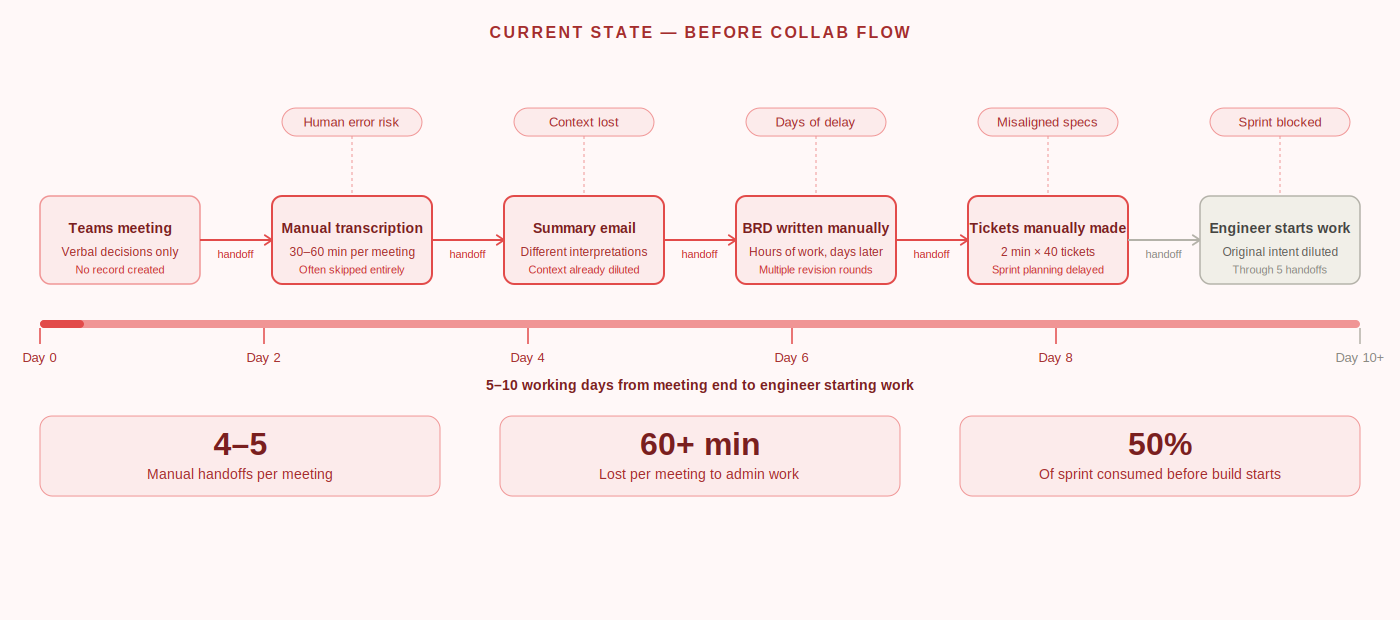
The gap between ‘we discussed it’ and ‘it’s in the backlog’ was where momentum went to die.
The journey from meeting end to engineer starting work took 5 to 10 working days on average nearly half a 2-week sprint, consumed before a single line of code was written. This wasn’t a people problem. It was a systems problem with five distinct failure points:
Manual transcription overhead
Context lost in translation
No single source of truth
Ticket creation bottleneck
The invisible handoff tax
THE SOLUTION FLOW
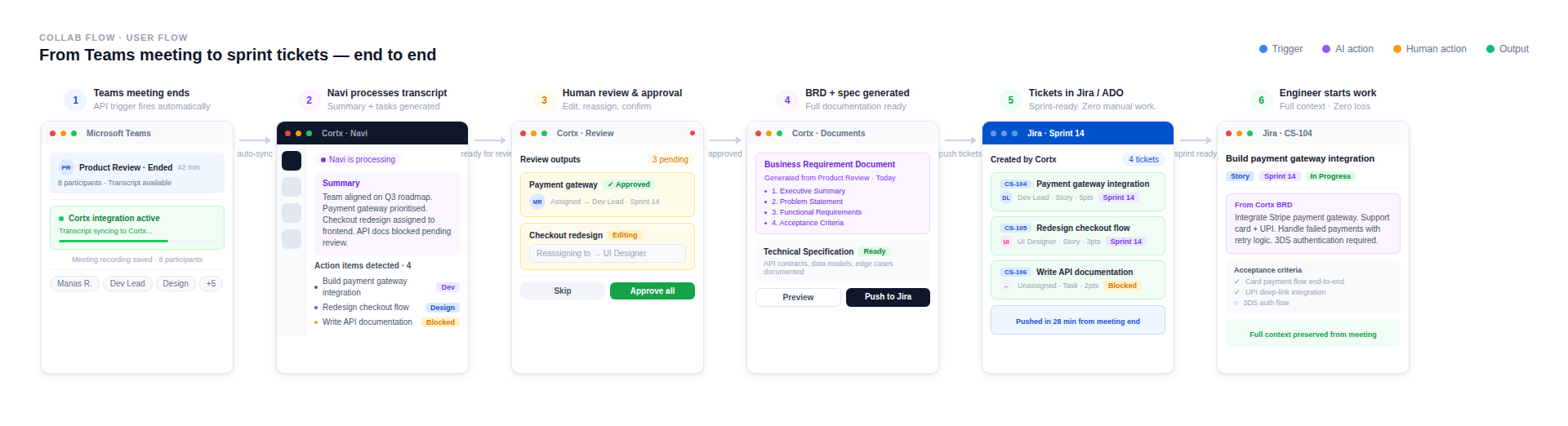
Defining the end-to-end architecture
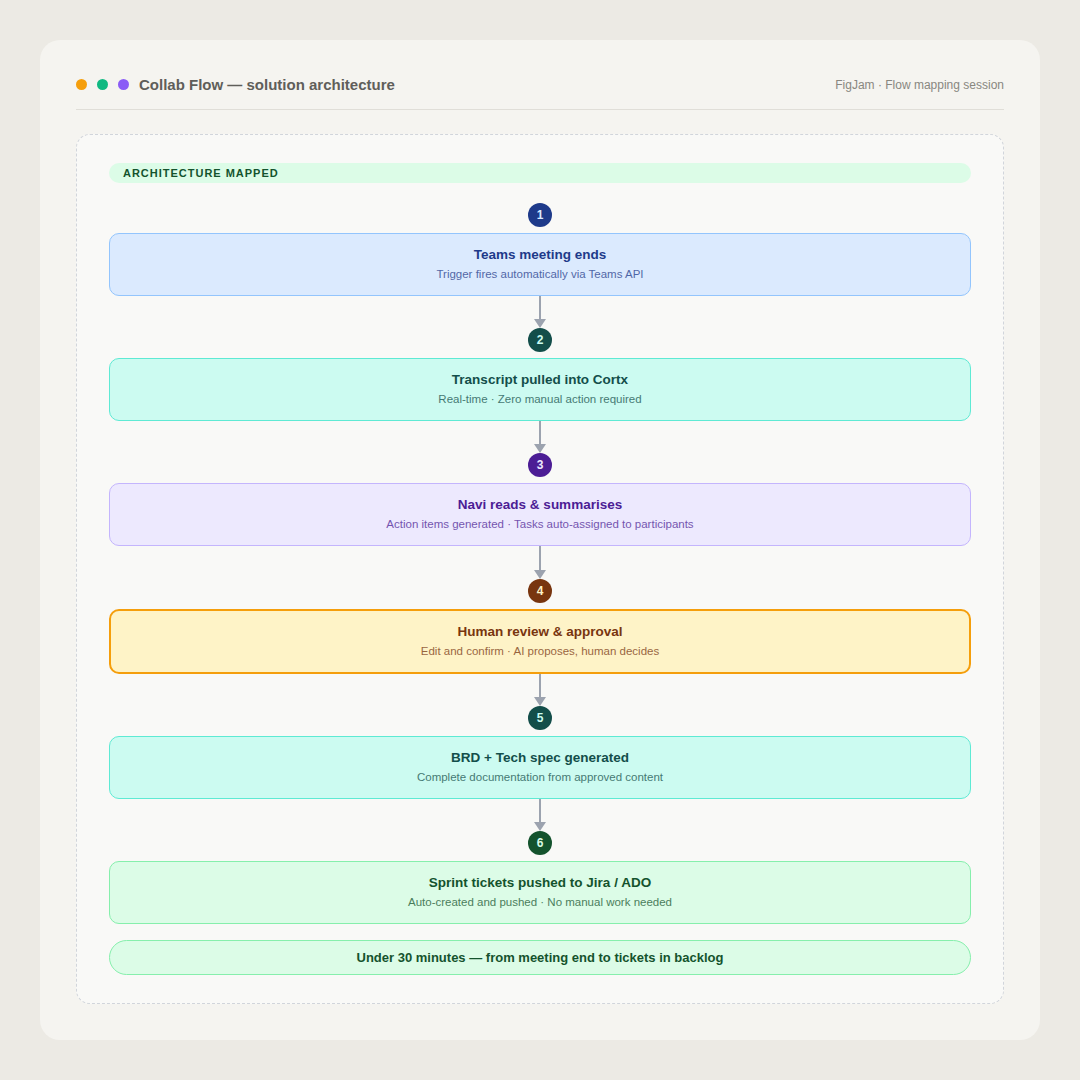
Microsoft Teams meeting ends
Teams API integration triggers automatically — no manual action required from the user.
Transcript pulled into Cortx in real time
Navi reads and processes the conversation
Summary + action items generated
Human review & approval
BRD + Technical Specification generated
Sprint tickets pushed to Jira or Azure DevOps
DISCOVERY & RESEARCH
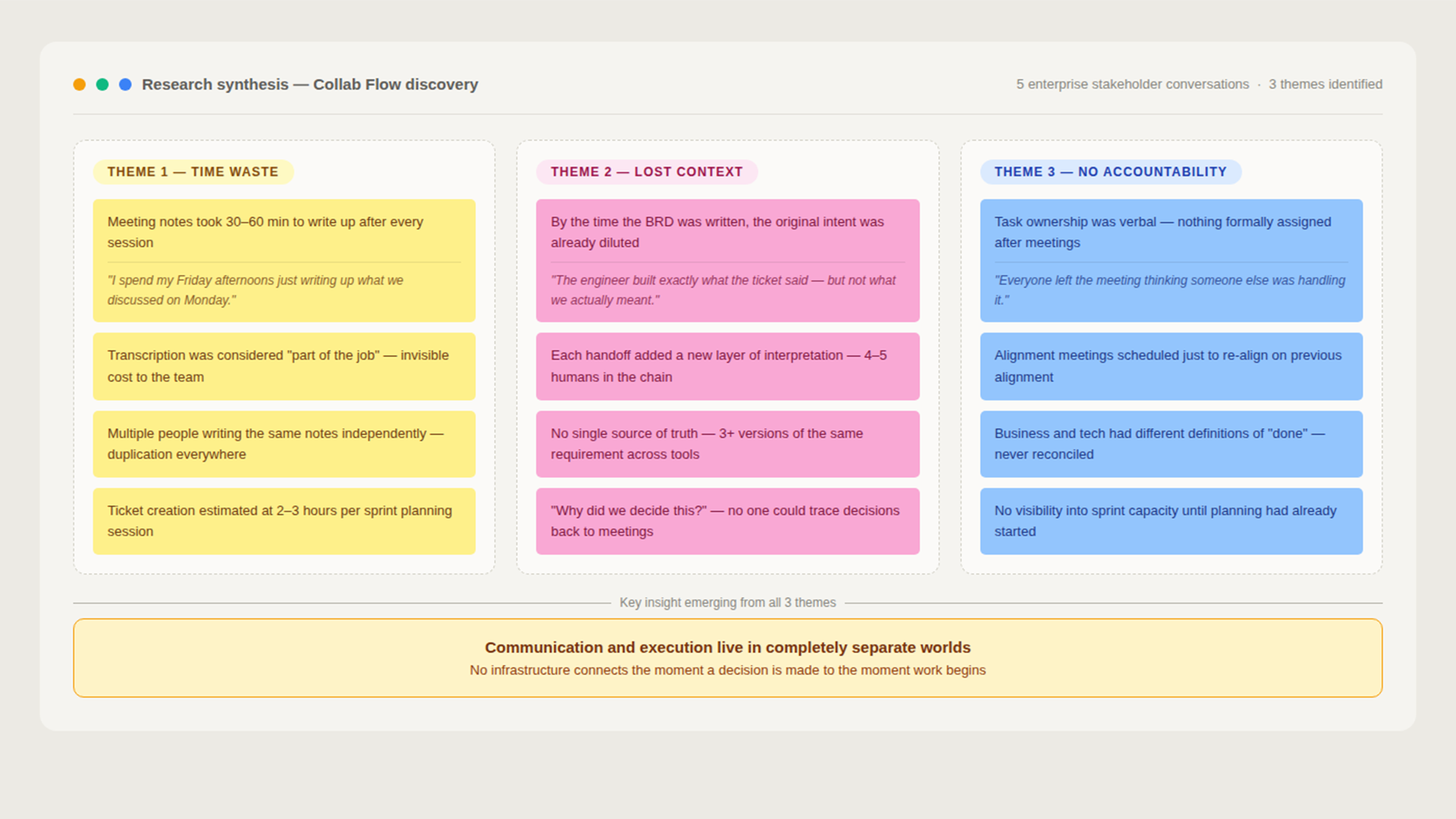
Finding where time was actually being lost
MY PROCESS
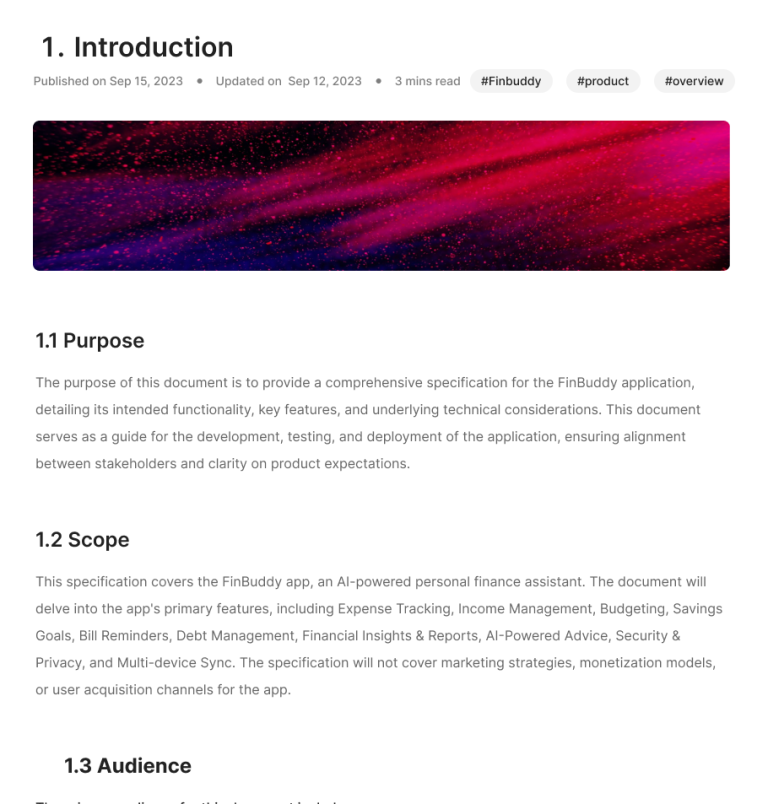
The BRD Template — A Multi-Stakeholder Alignment Challenge
- Presented to business stakeholders first — iterated on context and objective sections
- Presented to tech leads — iterated on functional requirements and constraints
- Consolidated into a unified template with sign-off from both sides
- Locked as the source of truth before engineering built the generation logic
Briefing Design — The AI Handoff Moment
- The AI working states — progress without overwhelming technical detail
- The review screen — every output visible and editable before push
- Error states — what happens when a transcript is incomplete or Navi’s confidence is low
- Design principle: the AI should feel like a capable colleague, not a black box
Engineering Coordination
Microsoft Teams API Integration
Navi’s Summarisation Accuracy
Jira vs ADO — Unified Logic
Testing an AI-powered flow is fundamentally different from testing a deterministic system. I built a comprehensive edge case matrix across 6 categories before engineering started — so QA had a clear definition of expected behaviour for every scenario.
GTM & Documentation
• Wrote all help documentation — covering setup, the Teams integration, how to read Navi’s outputs, and how to edit before pushing to Jira/ADO
• Created the feature demo video — a Loom walkthrough showing the full flow end-to-end, used for client onboarding and sales
• Aligned GTM messaging around a single, clear value proposition: ‘What used to take your team weeks now takes 30 minutes’
STAKEHOLDER MAP
Who I worked with — and how
| Stakeholder | Discovery | Definition | Design | Build | QA | Ship & GTM | |
|---|---|---|---|---|---|---|---|
| Internal | |||||||
| Manas (PM Associate) | You | R | R | R | R | R | R |
| Product owners & PM | Internal | A | A | I | I | I | A |
| Engineering team | Internal | I | C | C | R | C | I |
| Design team | Internal | I | C | R | I | I | I |
| QA team | Internal | I | C | I | C | R | I |
| GTM & content | Internal | I | I | I | I | I | R |
| External | |||||||
| Enterprise biz users | Client | C | C | C | I | I | C |
| Enterprise tech teams | Client | I | C | I | I | I | I |
KEY DESIGN DECISIONS
The calls that shaped the product
01 — AI autonomy
How much should Navi decide on its own?
✓ What I chose
A mandatory human review step at every stage. The AI proposes, the human confirms. No output is pushed downstream without explicit user approval.
✗ What I didn't choose
Why: Trust is a product feature. Enterprises don’t adopt AI tools that take control away from them. The review screen wasn’t a compromise — it was the product.
02 — PM tool integration
Two systems, one output logic
✓ What I chose
✗ What I didn't choose
03 — Confidence thresholds
When does the AI act, and when does it stop?
✓ What I chose
✗ What I didn't choose
THE IMPACT
What changed?
90%
Faster product development
65%
Reduction in development costs
HOW I MEASURED SUCCESS
The signals that told, it was working
🟢
Time from meeting to in backlog
Before: 5–10 working days → After: under 30 minutes
🔵
Product development speed
90% faster product development reported across 3 enterprises
🟠
Development cost reduction
65% reduction in development costs reported by enterprise teams
PROJECT TIMELINE
One quarter. Discovery to ship.
DISCOVERY
DEFINITION
BUILD
SHIP & ITERATE
Discovery & Problem Mapping
Flow Architecture & BRD Template Alignment
Design Briefing & Edge Case Matrix
Build — Engineering Coordination
Ship, GTM & Documentation
CHALLENGES & HOW I NAVIGATED THEM
How do you get enterprises to trust AI-generated specs?
How do you align business and tech teams on what "good output" looks like?
When does the AI act, and when does it stop and ask the human?
How do you test an AI system where "correct" is sometimes subjective?
LEARNINGS
What I'd carry forward
01
The most important PM work happens before the product is defined.
Getting business and tech stakeholders to agree on what “good” looks like — before a line of code is written — was the hardest and most valuable thing I did on this project.